VPN protocol comparison: which protocol is best for your needs
A clear, practical comparison of major VPN protocols, their strengths, weaknesses, and ideal use cases.
VPN protocol comparison: which protocol is best for your needs
Choosing a VPN protocol isn’t just a technical detail. It directly affects speed, reliability, device compatibility, and how well your data is protected. Below is a practical, up-to-date guide to the major VPN protocols, what they do well, and where you might choose one over another. We’ll cover security, performance, and typical use cases so you can pick the right tool for your situation.

Quick protocol feature snapshot
| Protocol | Security level | Speed relative to peers | Mobile support | Ease of setup | Notes |
|---|---|---|---|---|---|
| OpenVPN | High | Moderate | Good | Moderate | Mature, configurable |
| WireGuard | Very high | Fast | Excellent | Easy | Lightweight, modern |
| IKEv2/IPsec | High | Fast | Excellent | Easy | Great for mobile |
| L2TP/IPsec | High | Moderate | Good | Easy | Dual-stack support |
| PPTP | Low | Fast | Limited | Easy | Deprecated, insecure |
Compiled November 2026; check the provider's site for current details.
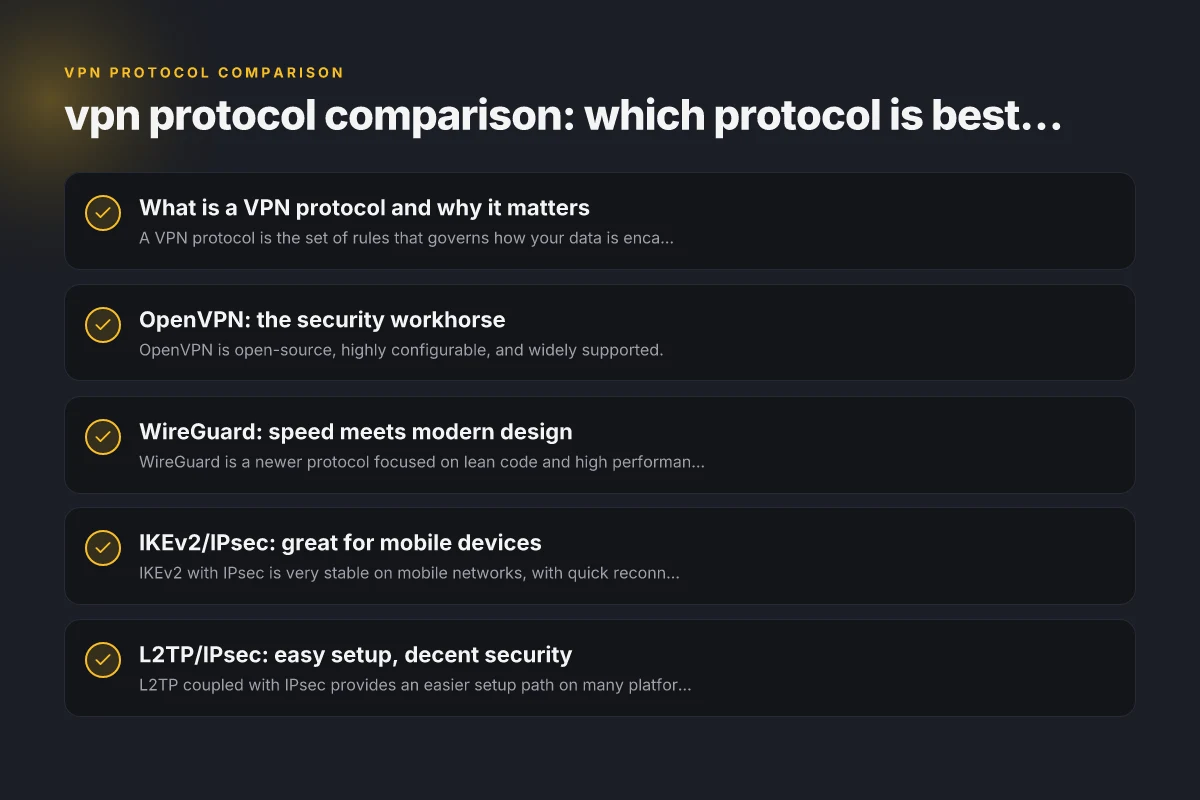
What is a VPN protocol and why it matters
- A VPN protocol is the set of rules that governs how your data is encapsulated, encrypted, and transmitted between your device and the VPN server.
- Different protocols trade off speed, security, and ease of setup. Some prioritize strong encryption and reliability. Others optimize for speed and low latency.
Key factors to compare:
- Encryption strength and authentication methods
- Speed and latency
- Stability on mobile networks
- Ease of use and configuration
- Compatibility with devices and platforms
- Resistance to network blocking and throttling
OpenVPN: the security workhorse
- OpenVPN is open-source, highly configurable, and widely supported.
- It often runs over UDP for speed or TCP for reliability beyond unusual networks.
- Security profile: strong encryption options (AES-256, 2048-bit keys with robust ciphers) and solid authentication.
Why choose OpenVPN:
- You want strong, battle-tested security and broad compatibility (Windows, macOS, Linux, iOS, Android, routers).
- You’re connecting from networks that may block or throttle less common protocols.
- You don’t mind a bit more setup complexity or slightly slower speeds compared to wireguard when configured optimally.
Limitations:
- Can be slower than modern protocols on some networks.
- More hardware resources needed on some devices if using heavy encryption or deep tunneling.
WireGuard: speed meets modern design
- WireGuard is a newer protocol focused on lean code and high performance.
- It uses modern cryptography and aims for faster handshakes and lower overhead.
- Security profile: strong, with audited code. Simpler configuration reduces misconfiguration risk.
Why choose WireGuard:
- You value speed and low latency, especially for streaming, gaming, or interactive apps.
- You’re on devices with modern kernels or where the VPN client supports WireGuard efficiently.
- You want a compact codebase that’s easier to audit.
Limitations: Turn off Surfshark VPN
- Privacy model differs from OpenVPN. Some implementations retain fewer logs, but some providers use a “no-logs” stance differently due to design choices. Always check provider-specific privacy policies.
- In some jurisdictions or networks, WireGuard traffic can be easier to fingerprint. Many providers mitigate this with masquerading or protocol variants.
Real-world considerations table
| Consideration | OpenVPN | WireGuard | IKEv2/IPsec | L2TP/IPsec | PPTP |
|---|---|---|---|---|---|
| Auditability | Open-source | Open-source | Open-source | Moderate | Closed (legacy) |
| Firewall traversal | Great with UDP/TCP | UDP suitable | UDP/TCP | UDP/TCP | Often blocked |
| Battery impact (mobile) | Moderate | Low | Low | Moderate | High |
| NAT compatibility | Good | Excellent | Excellent | Good | Poor |
| Platform support | Wide | Wide | Wide | Wide | Limited |
| Vendor reliance | Independent | Community-driven | Broad | Vendor-dependent | Vendor-dependent |
Compiled November 2026; check the provider's site for current details.
IKEv2/IPsec: great for mobile devices
- IKEv2 with IPsec is very stable on mobile networks, with quick reconnects when switching networks or reconnecting after sleep.
- It’s efficient and supports strong encryption parameters. Works well on iOS, Android, and many desktops.
Why choose IKEv2/IPsec:
- You frequently switch between mobile data and Wi‑Fi and need reliable, fast reconnections.
- You require solid security with good performance on mobile devices.
- You want a protocol that is widely supported by default on many platforms.
Limitations:
- Some providers offer IKEv2 with proprietary tweaks. Verify real-world guarantees and audit status.
- Not as ubiquitous on legacy systems as OpenVPN, though broadly supported.
L2TP/IPsec: easy setup, decent security
- L2TP coupled with IPsec provides an easier setup path on many platforms, sometimes built into the OS.
- It can be easier to configure on devices without a dedicated VPN client.
Why choose L2TP/IPsec: VPN Xbox browser
- You need straightforward, out-of-the-box compatibility on older devices or platforms.
- You’re setting up a VPN on hardware that has built-in L2TP/IPsec support and you don’t want to install extra software.
Limitations:
- Generally slower and less secure if not paired with strong IPsec settings. Also more vulnerable to certain types of network interference compared to OpenVPN or WireGuard.
- Often blocked or throttled by networks that scrutinize VPN traffic.
PPTP: fast but outdated and insecure (use with caution)
- PPTP is one of the oldest VPN protocols and is known for speed.
- It offers minimal encryption by design and is widely considered insecure for modern needs.
Why you might still see PPTP:
- Rarely, for very old devices or specific legacy setups where compatibility is the sole requirement and security is not a concern.
Caveats:
- Not recommended for protecting sensitive data or privacy.
- Many services and networks have deprecated or blocked PPTP due to its weak security.
Quick decision guide for common needs
| Use case | Recommended protocol | Why | Alternatives | Caveats |
|---|---|---|---|---|
| Personal browsing | WireGuard | Fast, simple | IKEv2/IPsec | Privacy policies |
| Mobile on the go | IKEv2/IPsec | Excellent mobility handling | WireGuard | OpenVPN |
| Corporate/long-term | OpenVPN | Highly configurable | IKEv2/IPsec | L2TP/IPsec |
| Easy setup for layman | L2TP/IPsec | Straightforward | PPTP (not recommended) | OpenVPN |
| High security, flexible configs | OpenVPN | Customizable, audit-ready | WireGuard | IKEv2/IPsec |
Compiled November 2026; check the provider's site for current details. NordVPN blocking Google
Quick comparison: a practical table
Here is a simple snapshot to help compare common protocols at a glance. Note that exact performance varies by provider, device, network, and server load.
Protocol: OpenVPN
Security: High (AES-256, robust authentication)
Speed: Moderate to good (depends on configuration)
Mobile support: Excellent with good client apps Microsoft Edge secure network VPN: what it is, how it works, and what to know
Ease of setup: Moderate (more configuration options)
Typical use case: Privacy-conscious users, broad compatibility, custom configurations
Protocol: WireGuard
Security: High (modern cryptography, audited)
Speed: Very fast (low overhead) SSL VPN poscoenc: What POSCO E&C users should know about SSL VPN
Mobile support: Excellent on modern devices
Ease of setup: Easy in modern clients, simpler configuration
Typical use case: Streaming, gaming, low latency needs
Protocol: IKEv2/IPsec
Security: High NordVPN in China
Speed: Very good, especially on mobile
Mobile support: Excellent
Ease of setup: Good on many platforms
Typical use case: Mobile users, fast reconnects across networks
Protocol: L2TP/IPsec WuKongVPN: A Practical Look at Its Features and Where
Security: Moderate to High (with IPsec)
Speed: Moderate
Mobile support: Good on many platforms
Ease of setup: Easy on many devices
Typical use case: Easy setup on legacy devices, compatibility focus Which NordVPN subscription plan is right for you
Protocol: PPTP
Security: Low
Speed: Fastest among traditional options
Mobile support: Limited to legacy scenarios
Ease of setup: Very easy Best VPN for Linux mint
Typical use case: Very old devices or legacy networks where security is not a concern
How to choose: a quick decision guide
- If security and flexibility are your top priorities: OpenVPN or WireGuard are strong bets. OpenVPN is exceptionally versatile and well-vetted; WireGuard excels in speed and simplicity.
- If you’re on mobile and care about seamless roaming: IKEv2/IPsec often shines due to quick reconnections and solid mobile performance.
- If you need easy setup on a wide array of devices, including older hardware: L2TP/IPsec can be a straightforward choice, but verify modern security configurations.
- If you’re evaluating speed at the expense of encryption: WireGuard usually wins on raw speed, but ensure the provider’s implementation and privacy policy align with your needs.
- If you’re dealing with very old devices or constrained networks: PPTP should generally be avoided for anything beyond a casual, non-sensitive connection.
Real-world considerations when comparing VPN protocols
- Server load and routing: Even the best protocol can feel slow if servers are overloaded. Pick a reputable provider with well-distributed servers.
- Client software quality: The user experience matters. A great protocol can be hampered by a poorly designed client or buggy firmware on routers.
- Privacy policy and logging: Protocol choice matters less than how the provider handles logs, DNS requests, and data retention.
- Network routing techniques: Some providers implement NAT, split tunneling, or obfuscation to improve performance or mitigate censorship. Check if these features align with your needs.
- Legal and regulatory context: Some regions have stricter surveillance or data-retention laws. Your protocol choice may be part of a broader privacy strategy.
Conclusion and recommendation
For most users seeking a strong balance of security, speed, and broad compatibility, a modern, audited protocol like WireGuard or OpenVPN is the best starting point. If you value exceptional mobile performance and fast reconnects, IKEv2/IPsec is a solid alternative. If you’re working with legacy devices or simple network environments, L2TP/IPsec can be practical, but be mindful of its security caveats. PPTP should be avoided for anything beyond non-sensitive testing or very old hardware.
Ultimately, the best VPN protocol for you depends on your device portfolio, your typical network environments, and what you value most, speed, security, or seamless mobile use. Pair your protocol choice with a reputable VPN provider that has transparent security practices, up-to-date audits, and clear privacy policies, and you’ll have a robust, reliable VPN experience.
| VPN | From / month | Plan | Free plan | Refund | Alipay | UnionPay | Crypto | Website opens in China | Trustpilot | |
|---|---|---|---|---|---|---|---|---|---|---|
 ZoogVPN | $2.49/mo | 27 months: $59.99 | Yes | 7 days | ✓ | ✓ | ✓ | ✓ | ✓ Yes (2.5 s) | 4.2/5 (195 reviews) |
 NordVPN | $3.49/mo | 27 months: $94.23 | No | 30 days | ? | ✗ | ✓ | ✓ | ✗ Blocked | 4.2/5 (51,628 reviews) |
 ExpressVPN | $3.00/mo | 28 months: $84 | No | 30 days | ✗ | ✗ | ✓ | ✗ | ✗ Blocked | 4.4/5 (29,706 reviews) |
 Surfshark | See site | See site | No | 30 days | ✗ | ✗ | ✗ | ✓ | ✗ Blocked | 4.3/5 (31,823 reviews) |
 Proton VPN | $2.99/mo | 12 months: $35.88 | Yes | 30 days | ✗ | ✗ | ✗ | ✓ | ✓ Yes (2.5 s) | 2.1/5 (1,040 reviews) |
 Astrill VPN | $12.50/mo | 24 months: $300 | No | See site | ✗ | ✗ | ✗ | ✓ | ✗ Blocked | 1.3/5 (110 reviews) |
 Private Internet Access | $2.03/mo | 40 months: $81.2 | No | 30 days | ✗ | ✗ | ✗ | ✗ | ✗ Blocked | 4.2/5 (11,033 reviews) |
 CyberGhost | $2.19/mo | 28 months: $61.32 | No | 45 days | ✗ | ✗ | ✗ | ✓ | ✗ Blocked | 4.0/5 (24,178 reviews) |
 PureVPN | $1.69/mo | 60 months: $101.55 | No | 31 days | ? | ✗ | ✗ | ✓ | ✓ Yes (2.6 s) | 4.4/5 (17,994 reviews) |
 AdGuard VPN | $2.99/mo | 24 months: $71.76 | Yes | 30 days | ✓ | ✗ | ✓ | ✓ | Official site blocked; our special link opens (2.3 s) | 4.3/5 (290 reviews) |
 Mullvad | $5.61/mo | €5/mo | No | 14 days | ✗ | ✗ | ✗ | ✓ | ✗ Blocked | 3.2/5 (192 reviews) |
 Windscribe | $5.75/mo | 12 months: $69 | Yes | See site | ✗ | ✗ | ✗ | ✓ | ✗ Blocked | 4.7/5 (13,355 reviews) |
 StrongVPN | See site | See site | No | 30 days | ✓ | ✗ | ✗ | ✗ | ✗ Blocked | 4.4/5 (2,695 reviews) |
 LightXtreme 闪连 | $7.08/mo | 12 months: $84.99 | Yes | 30 days | ✓ | ✓ | ✓ | ✓ | ✓ Yes (2.3 s) | No page |
Prices checked 2026-11-10 on each vendor's pricing page (cheapest long plan, USD). Check the vendor's checkout for the final price.
Payment methods checked 2026-11-10 on each vendor's payment pages: all 14 take cards and PayPal; ✗ = not listed, ? = the vendor's own pages disagree.
China access: whether the official website opens from mainland China networks (tests the website only, not the VPN connection). Last checked 2026-11-11 04:07 Beijing time.
Trustpilot score and review count checked 2026-11-10.